On the 3rd of October, after some quite high load, my website crashed and went offline. Given I’d just gone to Sweden, this was a bit awkward.
Looking at the stats – on the 2nd of October it was getting on average 5 page loads *per second* – except it wasn’t evenly spread traffic – it peaked much high with 9% of the whole day’s traffic happening between 7pm and 8pm.
At the time, the site was running on a simple Debian BigV VM, with 1GB ram, SATA disk storage, 2 cores and 1 GB of swap and I thought it might be interesting to look at the architecture I was using, which let a relatively low specification machine handle 25,000 page views in 24 hours with 9,000 unique visitors.
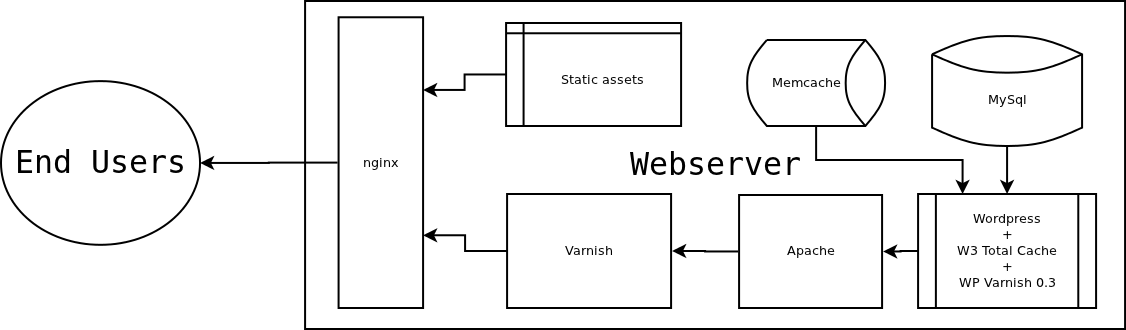
When a request is sent for a page on the website, the first thing it hits in nginx – if it’s a static asset – an uploaded image like the one above, or part of the theme etc. it is served directly from disk by nginx. If it’s anything else, it’s sent to Varnish, which has a cache of pages it’s previously loaded sitting in memory (malloc), if the page hasn’t been found in the varnish cache, it’s passed back to Apache and the WordPress/PHP/MySQL stack sorts it out and sends it back. The next time that page is asked for, Varnish will send the cached version.
I installed WordPress installed from the Debian package, for ease of upgrades and there are two performance related WordPress plugins installed – W3 Total Cache and WP Varnish. W3 Total Cache does a bit of caching into memcache, and a few other tweaks, but the majority of the load is handled in Varnish. Using Apache to do webserver-ing makes life simpler, because we don’t have to mess around rewriting .htaccess rules into a different syntax.
WP Varnish is basically the hook we need to flush the varnish cache whenever something changes – when someone comments, when a page is updated, when a new page is added – WP Varnish will issue varnish with a “flush” that will ensure that viewers see the most up to date page.
The nice thing about this is that users can look at pages without ever touching Apache or the database once, with the page being dumped out over the network port from RAM, and the images etc, simply being read off the disk – resulting in fast server response times, and great scaling.
When, on the third, Varnish crashed, I hadn’t ever envisaged that amount of traffic – in fact I’d deliberately made the server relatively small/underspecified to see how it would perform under pressure.
Arguably, it’s over complicated, has unnecessary complication (W3 Total Cache + Memcache seem like recipes for confusion and pain) and I could just use nginx, php-fpm and varnish, but this setup gives me the flexibility and known quantity that is Apache, whilst letting me still scale my site to reddit-proof-like proportions.
I think really the lesson I learnt, is that all the services should be running under runit or monit, to make sure that, in the event of a service stopping responding, it’ll be automatically restarted.